SvelteKit Blog Engine v1.0.0.10 Release Notes
Here is a summary of the updates introduced in SvelteKit Blog Engine v1.0.0.10.
As multilingual publishing grew, managing mixed-language articles in a single chronological list became increasingly tedious. In this update, we focused on implementing dynamic language filter tabs in the admin post management dashboard, refining the Blog Hub federation protocol, adding editor safeguards against formatting loss, and simplifying multi-account deployment commands.
1. Dynamic Multilingual Filter Tabs in Post Management
Previously, all posts were listed strictly in chronological order regardless of their language. Managing dozens of articles across Korean, English, and Japanese required unnecessary scrolling and searching.
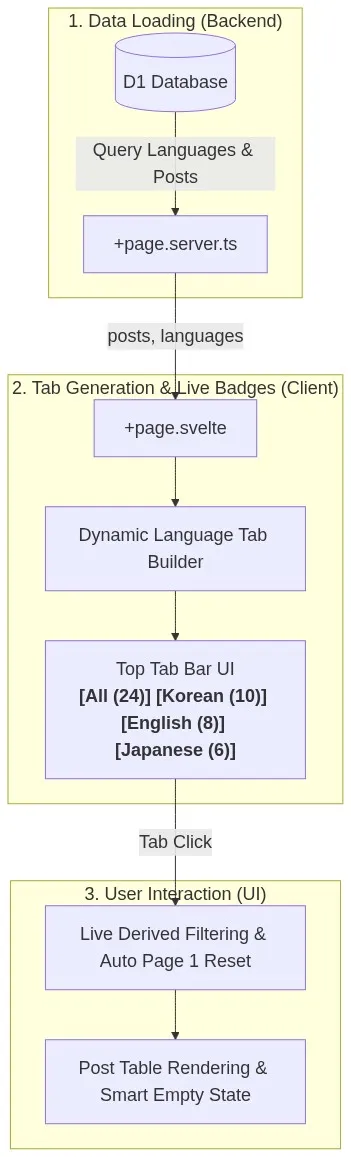
Key Improvements
- Dynamic Language Detection & Live Count Badges: Instead of hardcoding language codes, the system queries active database languages and post entries in real time. Each tab displays live post counts (e.g.,
[All (24)],[Korean (10)],[English (8)],[Japanese (6)]). - Smart Empty States: Clicking a language tab with zero posts (e.g.,
English (0)) shows a helpful prompt along with a direct[+ Write New Post in this language]button to streamline the authoring workflow. - Single-Language Mode Support: For blogs operating in only one language, the tab bar remains hidden to keep the interface clean and minimal.
- Language Chips & Safe Pagination: Table rows now display crisp language badges (
KR,EN,JA, etc.) next to titles, and switching tabs automatically resets the view to Page 1 to avoid blank pagination bugs.
2. Refined Blog Hub (hub.sveltekitblog.com) Integration
We polished several edge cases when syncing articles to the centralized feed platform, SvelteKit Blog Hub.
Improvements
- 1,500-Character Standard HTML Intro Extraction: Automatically parses and extracts clean 1,000–1,500 character HTML introductory excerpts from both Markdown and Visual HTML formats for feed summary cards.
- Absolute Image URL Conversion: Transforms relative image paths (
/images/posts/...) into absolute URLs containing the canonical domain (https://yourdomain.com/images/...) so that thumbnails and in-article images render properly on external feeds. - Publish Date Timeline Preservation: When updating an existing article, the original
published_attimestamp is preserved instead of being overwritten by the edit date, keeping the Hub timeline chronological. - Default Auto-Publish Setting: Added a toggle under Admin Settings (
⚙️ Settings) to enable "Auto-Submit to Hub" by default for new posts.
3. Post Editor Data Loss Protection Guards
We added protective measures in the post editor to prevent accidental loss of content or formatting when switching modes.
- HTML to Visual Mode Warning: Switching from raw HTML to the Visual editor can cause non-standard tags, custom tables, or inline styles to be sanitized by the editor parser. A confirmation dialog now alerts you before the switch occurs.
- Editor Format Lock: Existing saved posts have their editor type (HTML vs. Markdown) locked to prevent accidental corruption, with warning prompts if changes are attempted.
4. Simplified Multi-Account Deployment CLI
The deploy-multi script arguments have been streamlined for faster and more intuitive operations:
# Previous format
npm run deploy:multi -- myaccount --admin-only

# New streamlined format
npm run deploy:multi -- myaccount admin   # Fast admin-only deploy
npm run deploy:multi -- myaccount blog    # Fast blog-only deploy
npm run deploy:multi -- myaccount         # Deploy both blog and admin
(Legacy flags like --admin-only and --blog-only remain 100% backward compatible.)
How to Apply the Update
Pull the latest repository commits and run your deployment command:
# Pull latest code
git pull origin main

# Deploy admin (example)
npm run deploy:admin
# Or for multi-account deployment
npm run deploy:multi -- <account_name> admin
We will continue to refine and enhance the engine based on real-world usage. Thank you!
0 Comments
Login is required to write comments.