🚀 Two Methods to Deploy Websites on Cloudflare Pages and Core Concepts
After building a website or blog, the next big question is: "How do I deploy this to the internet so people can visit?"
In the past, you typically had to pay a monthly fee for a Virtual Private Server (VPS), configure an Nginx web server, and manually manage SSL certificates. Today, Cloudflare Pages (CFP) allows you to deploy web applications effortlessly with zero server management, blazing-fast global speeds, and a generous free tier.
This guide explains what Cloudflare Pages is, compares two deployment authentication methods (Interactive Browser Login vs. API Token), and introduces the core concepts of D1 Database and Workers KV Storage from an architectural perspective.
📂 1. What is Cloudflare Pages (CFP)?
In simple terms, Cloudflare Pages is a platform that hosts your website across hundreds of Cloudflare data centers worldwide, serving pages to visitors from the closest server at lightning speed.
It supports not only static assets (HTML/CSS/Images) but also full-stack frameworks like SvelteKit and Next.js that perform real-time Server-Side Rendering (SSR) and API routing.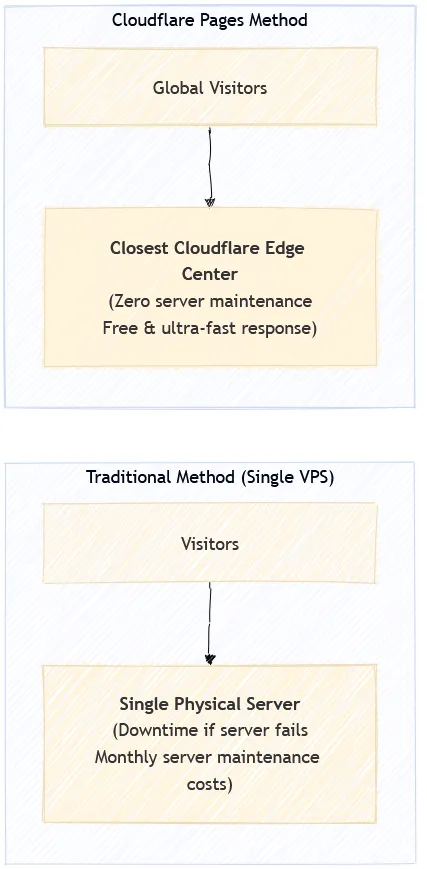
Why Choose Cloudflare Pages Over Traditional VPS?
- Zero Server Maintenance: No need to worry about OS security patches, Nginx config tuning, or monitoring server health. Cloudflare manages the infrastructure 24/7.
- Global Edge Performance: User requests are served from the geographically closest data center, dramatically reducing latency.
- Cost-Effective: Standard personal blogs and portfolios run comfortably within the generous Free Tier.
🔑 2. Two Methods to Deploy to Cloudflare from Your Machine
When running a SvelteKit build (npm run build), @sveltejs/adapter-cloudflare outputs static assets and a server execution worker (_worker.js) into the .svelte-kit/cloudflare directory.
The standard command to deploy this build output is npx wrangler pages deploy .svelte-kit/cloudflare, and there are two primary authentication workflows:
[Method 1] Interactive Browser Login Workflow (Wrangler Default)
The most intuitive method for beginners with a single account. Running the command opens a web browser to grant permissions.
# Build SvelteKit and deploy to Pages (interactive browser login)
npm run build
npx wrangler pages deploy .svelte-kit/cloudflare --project-name=my-blog-web --branch=production
- How it works: When you run the deploy command, Wrangler automatically opens your default browser and prompts you to log in to Cloudflare. Once you click [Allow], the authentication session is saved to your local machine (
~/.config/.wrangler), and deployment proceeds. - Advantages: No need to generate API tokens manually; it works seamlessly in a few clicks for single-account personal projects.
- Limitations:
- Switching between multiple Cloudflare accounts requires logging out and in via the browser each time.
- Cannot be used in headless environments or CI/CD pipelines (e.g., GitHub Actions).
[Method 2] Non-Interactive API Token Deployment (Standard for CI/CD & Multi-Account)
The industry standard for multi-account management and automated pipelines. You supply pre-generated tokens via environment variables without browser popups.
# Deploy with environment variables (PowerShell example)
$env:CLOUDFLARE_API_TOKEN="YOUR_CLOUDFLARE_API_TOKEN"
$env:CLOUDFLARE_ACCOUNT_ID="YOUR_ACCOUNT_ID_32_CHARS"
npx wrangler pages deploy .svelte-kit/cloudflare --project-name=my-blog-web --branch=production
- How it works: You generate an API token with required permissions (Pages, D1, KV) in the Cloudflare dashboard. Supplying this token as an environment variable allows Wrangler to authenticate in the background without opening a browser.
- Advantages:
- Runs quietly in the background without popups.
- Allows sandboxed, multi-account deployments without session conflicts.
- Prerequisite: Requires creating an API token in the Cloudflare dashboard once beforehand.
💾 3. Where Are Posts and Images Stored? (Understanding D1 and KV)
A dynamic blog requires more than just frontend UI; it needs reliable storage for articles, metadata, and media. Cloudflare provides two dedicated serverless storage solutions: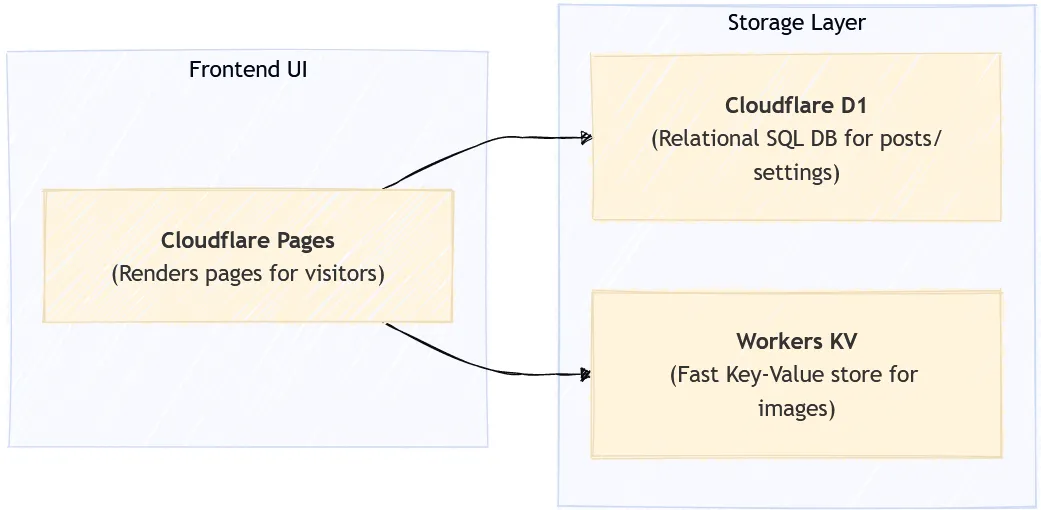
- Cloudflare D1 (Relational SQLite Database):
- A distributed SQL database structured into clean rows and columns.
- Stores structured data such as post titles, markdown/HTML content, published dates, categories, tags, and site settings with full SQL query capabilities.
- Workers KV (Ultra-Fast Key-Value Storage):
- A globally distributed key-value store optimized for high-read workloads.
- Serves uploaded thumbnails and images across global edge locations with sub-millisecond response times.
🧩 4. Architecture Showcase: SvelteKit Blog Engine
SvelteKit Blog Engine leverages Cloudflare's serverless infrastructure with an intelligent two-tier architecture: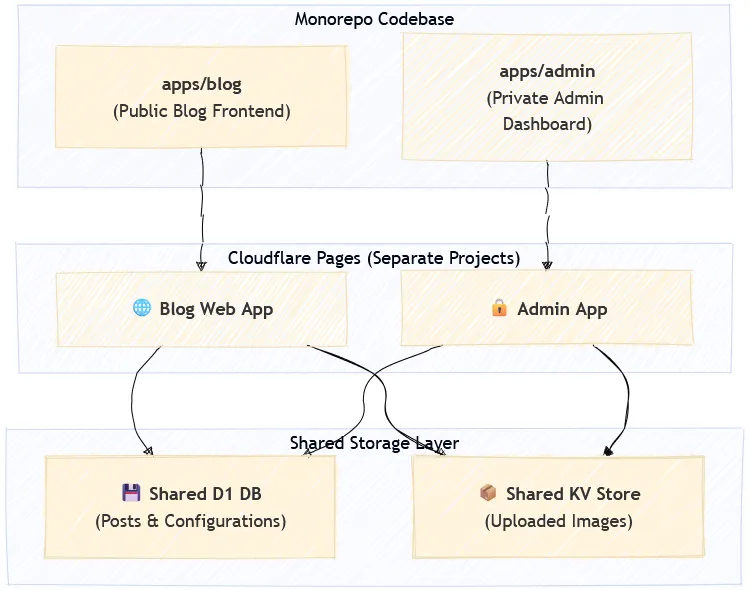
Why Separate Blog and Admin into Two Independent Pages?
Instead of bundling the entire application into a single monolithic app, SvelteKit Blog Engine decouples it into two standalone Cloudflare Pages projects:
- Minimized Attack Surface: Admin login logic, markdown/rich-text editors, and management API endpoints are completely absent from the public blog bundle. Running on a separate subdomain ensures strong isolation.
- Maximum Frontend Performance: The public blog bundle is extremely lightweight, containing zero admin or editor scripts. This results in blazing-fast First Contentful Paint (FCP) on mobile and desktop devices alike.
Data Flow
- When you write an article and upload images in the Admin Dashboard, the data is committed to the shared D1 Database and Workers KV.
- When a reader accesses the Public Blog, it retrieves the latest post data and images from the same D1 and KV instances to render the page instantly.
🚀 5. Conclusion
Cloudflare Pages empowers developers to run high-performance, full-stack web applications without the burden of server maintenance or costly hosting plans.
For single-site projects, starting with Interactive Browser Login (wrangler login) is fast and straightforward. As your infrastructure grows or requires multi-account automation, transitioning to API Token Deployment provides a scalable, conflict-free workflow.
0 Comments
Login is required to write comments.