🌐 Comprehensive Guide to SvelteKitBlog Hub Syndication and Auto-Publishing
When operating a standalone personal blog, the biggest challenge is "How can I introduce my articles to new readers?" Unlike commercial blogging platforms, a self-hosted blog gives you complete freedom over your data and design, but attracting initial traffic and achieving search engine visibility requires considerable time and effort.
SvelteKit Blog Hub (hub.sveltekitblog.com) is a decentralized federated feed platform designed to overcome the discoverability limitations of independent blogs, allowing creators to share readership, statistics, and mutual growth.
This guide provides a detailed walkthrough of everything you need to know—from obtaining an API Key and configuring the admin settings to managing the post lifecycle and leveraging Google AdSense synergies.
1. 🎯 Key Features and Working Principles
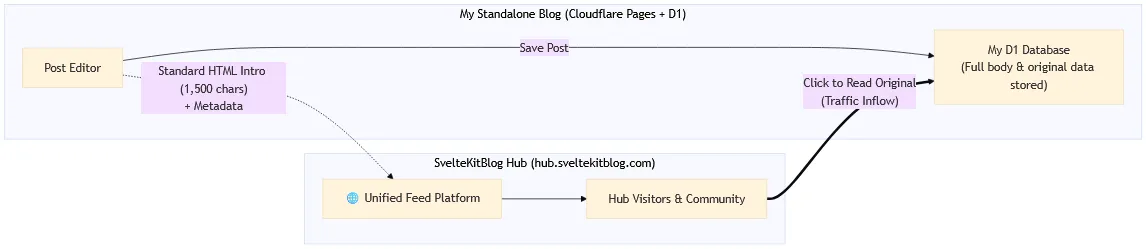
- Complete Data Independence & Ownership:
- The full article text and all database entries remain securely within your own Cloudflare D1 instance.
- Only a standard HTML introduction (1,000–1,500 characters) and essential metadata (title, thumbnail, slug, etc.) are transmitted to the hub for feed card rendering.
- Automatic Absolute URL Conversion for Images:
- Relative image paths (
/images/...) embedded in Markdown or HTML are automatically transformed into absolute URLs (https://yourdomain.com/...), ensuring crystal-clear previews on the hub feed without broken links.
- Relative image paths (
- Non-blocking & Fault-Tolerant Isolation:
- Even if the hub server experiences network latency or temporary downtime, your blog's internal post-saving transaction is guaranteed to complete normally without any interruption.
2. 🔑 Step 1: Obtain a Hub API Key & Configure Settings
① Obtain an API Key from the Hub Platform
- Visit SvelteKit Blog Hub 'Connect Blog (Get API Key)'.
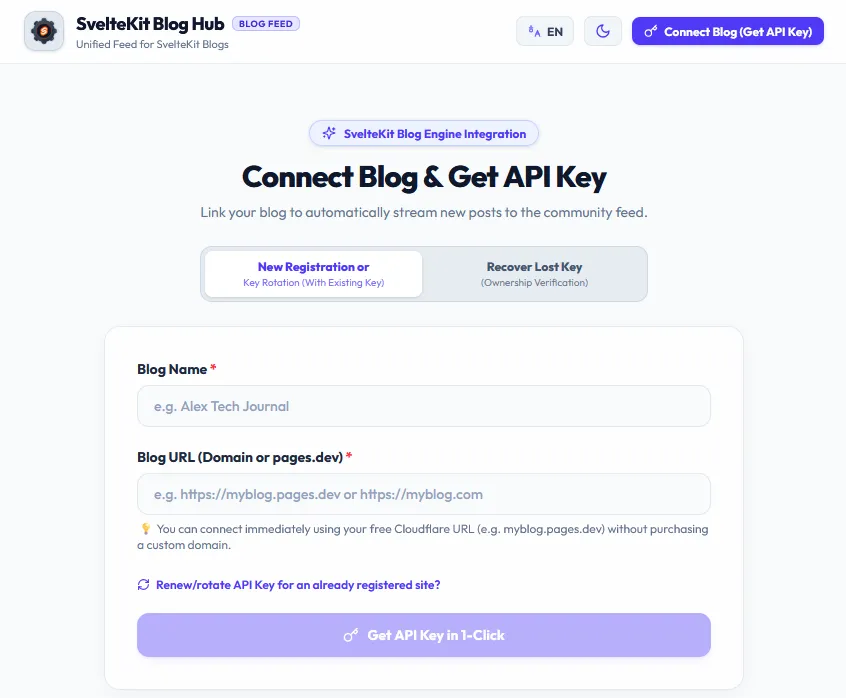
- Register your blog's canonical URL (e.g.,
https://myblog.com) and copy the uniquely generated Site API Key (sk_board_...orsk_hub_...).
② Configure Blog Admin Settings (⚙️ Settings)
- Log in to your blog's admin dashboard and navigate to [Settings].
- Locate the SvelteKitBlog Hub Syndication Settings section.
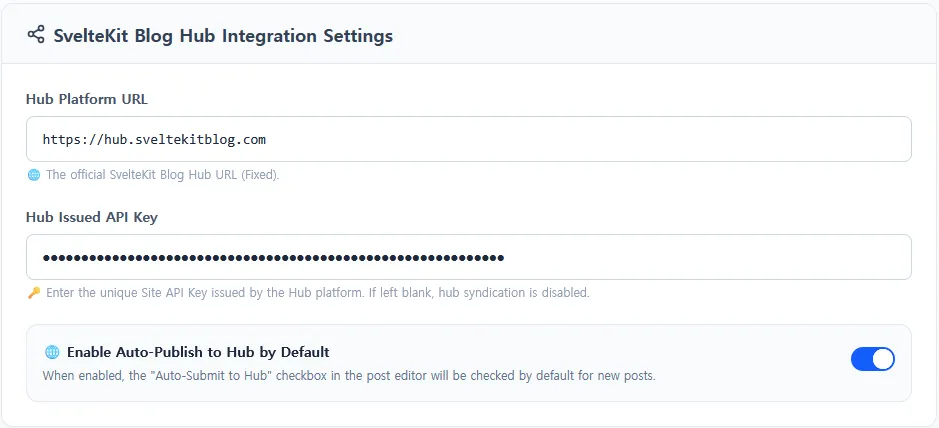
[ SvelteKit Blog Hub Integration Settings ]
* Hub Platform URL : https://hub.sveltekitblog.com (Fixed)
* Hub Issued API Key : sk_hub_live_... (Enter your issued key)
* 🌐 Enable Auto-Publish to Hub by Default : [ON / OFF Toggle]
- Enabling
Auto-Syndication by Defaultwill pre-check the syndication option whenever you create a new post. - Click [Save Settings] at the bottom to apply the configuration.
3. ✍️ Step 2: Auto-Publishing from the Post Editor
At the bottom of the metadata sidebar in the post editor (New Post or Edit Post), you will find the Hub Auto-Submission checkbox.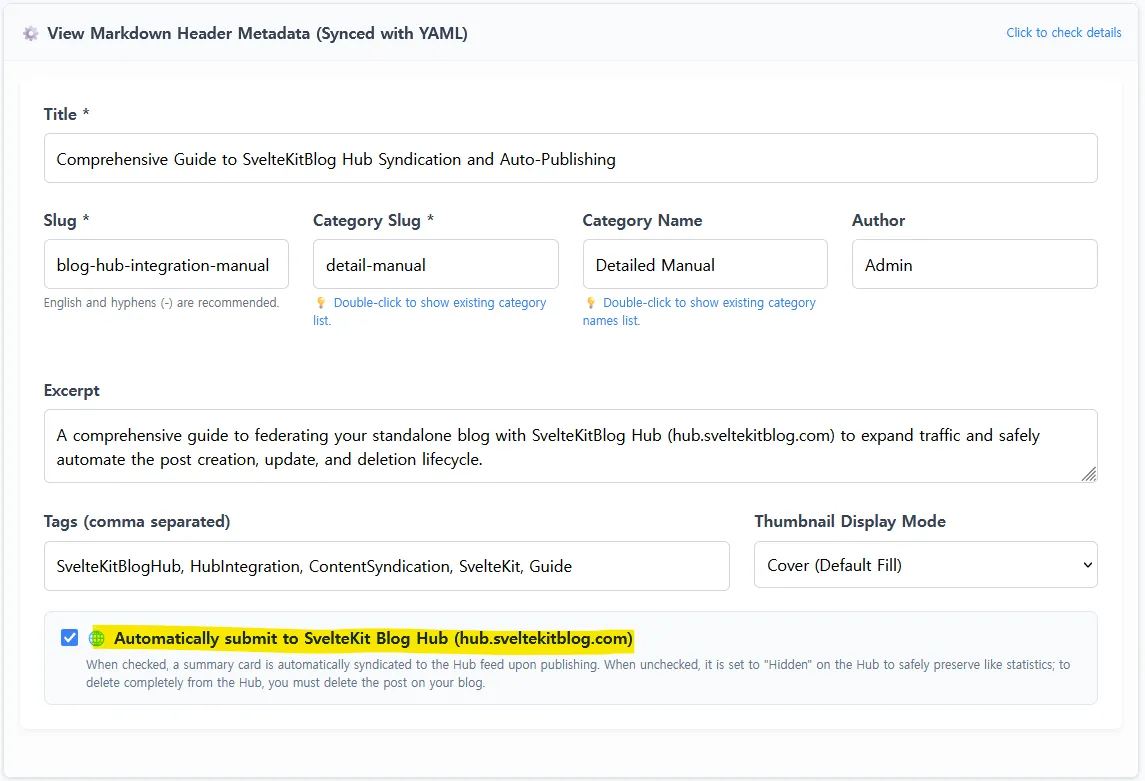
[☑️] 🌐 Automatically submit to SvelteKit Blog Hub (hub.sveltekitblog.com)
     When checked, a summary card is automatically submitted to the Hub feed upon publishing.
     When unchecked, it is set to "Hidden" on the Hub to safely preserve like statistics;
     to delete completely from the Hub, you must delete the post on your blog.
- Publishing Public Posts (
Status: Published):- When saved with the checkbox active, the HTML intro and thumbnail are dispatched to the hub simultaneously with the D1 database write, appearing instantly on the hub feed.
- Saving Drafts (
Status: Draft):- Posts saved as drafts will never be exposed on the public hub feed, even if the checkbox is checked.
4. 🔄 Step 3: Lifecycle Management (Edit, URL Change, Hide, Delete)
As you maintain your blog, you may update article content, reclassify categories, or hide/delete posts. The blog engine automatically detects these lifecycle events and syncs with the hub flawlessly.
| Scenario | Blog Action | Hub Synchronization Behavior |
|---|---|---|
| Content Update | Edit body and save | Preserves the original publication date (published_at) while updating card content and thumbnail (avoids jumping to the top of the feed unnecessarily) |
| Slug / Category Change | Change URL and save | Automatically deletes the previous URL card (DELETE) and registers the new URL (POST) (prevents broken 404 links) |
| Unpublish / Uncheck | Switch to Draft or uncheck | Sets card status to hidden (reader upvote/like statistics are permanently preserved) |
| Delete Post | Delete post from admin | Completely removes the card from the hub (DELETE) |
5. 💰 Google AdSense Readiness & Synergies
Traffic driven from the hub significantly accelerates Google AdSense approval and ad revenue generation.
- Securing Initial Active Traffic:
- Google crawlers index and rate websites with active, genuine reader traffic much faster than dormant sites with zero visitors.
- Automated
ads.txtServing:- Entering your AdSense authorization snippet (
google.com, pub-..., DIRECT, f08c47fec0942fa0) in the admin settings serves it immediately athttps://yourdomain.com/ads.txt.
- Entering your AdSense authorization snippet (
- Content Quality Guidelines:
- For primary AdSense approval, we recommend consistently publishing 15–20 high-quality technical or informative articles (1,500+ characters each) syndicated to the hub.
6. 🏁 Conclusion
By integrating with SvelteKitBlog Hub, you maintain 100% data sovereignty over your standalone blog while unlocking the powerful network synergy of a unified community feed!
0 Comments
Login is required to write comments.