🎨 Real-Time Design Editor and Background Customization Overview
This document introduces the system that applies theme configurations in real time without requiring server rebuilds or redeployments, and outlines the 4 background settings: Solid, Gradient, Background Image, and Custom JavaScript Canvas.
🌌 1. Real-Time Design Editor Overview
When you modify and save configuration values in the design editor, there is no need to rebuild or redeploy the blog server or CDN services. The database updates instantly, and the CSS variables and background rendering module reflect in the visitor's browser within seconds.
Before applying the design to the live blog, you can check the style changes through the preview screen inside the admin panel.
[!WARNING]
⚠️ Notice: Differences Between Admin Preview and Live Blog Design
The preview feature in the design editor does not guarantee a 100% identical environment to the live visitor page. Microscopic rendering differences (such as CSS variable evaluation or JavaScript Canvas rendering conditions) may occur between the admin preview and the actual blog.
Therefore, after changing any design configuration, we strongly recommend visiting your live blog directly and refreshing the page (F5) to verify the final rendering output.
🧱 Layout & Theme Configuration Settings
① Layout Customization
- Blog Structure: Select the base layout structure of the main page (e.g., 2-column, 3-column, etc.).
- Column Width Ratios: Fine-tune the width ratios of the main content column and sidebars (e.g., 1:2:1, 2:1:2, etc.).
- Maximum Width: Limit the maximum horizontal resolution of the entire layout container (e.g., 1200px, 1400px, etc.).
- Detailed Layout Values: Control the container side margins, card border radius, and box shadow depth effects.
② Basic Theme Colors
- Customize the Primary theme color, Secondary color, body Text color, Accent highlight color, Card Background (Card Bg), and Border colors.
③ Typography Settings
- Apply web fonts by entering font family names from the Google Fonts directory, and set the base font size.
④ Widget Arrangement Management
- Drag and drop available widgets to position them in different columns and arrange their render orders.
🧱 2. Device-Specific Independent Widget Placement
Configure widget positioning in the sidebar and content areas using drag-and-drop. You can customize layouts differently based on the visitor's screen size.
- Desktop: Displays selected widgets (e.g., tag clouds, category trees) only on wider screens. For mobile access, elements are omitted at the HTML transmission stage to maintain fast loading times.
- Mobile: Hides the widget on desktop viewports and restricts exposure exclusively to smartphone-sized mobile resolutions.
🌈 3. 4 Background Customization Options
Customize the sensory atmosphere of the blog using four supported background types:
① Solid (Solid Background)
- Choose a HEX code (e.g.,
#3b82f6) or HSL color code to create a clean, distraction-free screen that helps readers focus on the post content.
② Gradient (Gradient Background)
- Create linear gradients where multiple colors blend smoothly using the Gradient Builder tool.
- Adjust the gradient angle (Direction) slider and add or slide color stops to customize starting, intermediate, and ending colors.
③ Image (Background Image & Glassmorphism)
- Specify a remote image URL or use the upload button to add media assets to your library.
- Upload Optimization: Uploaded images are automatically converted to WebP format to prevent initial page load delays.
- Glassmorphism Overlay: Adjust the controls below to build a glassmorphism aesthetic that ensures text readability over background images.
| Setting | Recommended Range | Description |
|---|---|---|
| Glass Blur | 5px ~ 15px |
Applies a translucent frosted-glass blur filter below the content cards. |
| Overlay Opacity | 10% ~ 30% |
Controls the opacity of the mask overlaid behind the card container. |
| Overlay Color | #000000 or #ffffff |
Selects dark or light mask colors to maintain text contrast. |
④ Custom JavaScript (Custom JavaScript & Canvas Background)
- Supports custom JavaScript execution to render interactive Canvas animations on the client's browser background.
- Provides direct rendering control over the background canvas element (
canvas id="bg-canvas"). Detailed security restrictions and power-saving policies are explained in [4. Custom JavaScript Integration Specifications] below.
⚡ 4. Custom JavaScript Integration Specifications
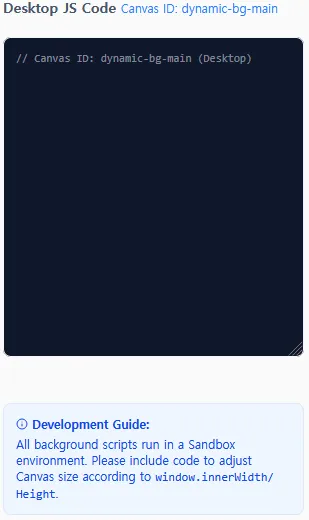
To prevent security risks and conserve mobile battery life, the following sandbox environment and battery-saving systems are applied.
🔒 Security Sandbox and CSP
The following security measures protect against malicious script injections:
- Isolated Sandbox Structure: Canvas code runs inside an isolated
iframewith limited execution privileges. Access to the parent page DOM, session cookies, or login credentials is blocked. - Content Security Policy (CSP): Outbound network calls and external script injections are completely blocked. Sensitive data cannot be leaked to external servers.
- JS API Restrictions: Disallowed APIs, including
fetch,XMLHttpRequest,WebSocket,eval,new Function,document.cookie, andlocalStorage, are intercepted and commented out (/* f_e_t_c_h (blocked) */) by the validator script (jsValidator.ts).
🔋 Power and Performance Optimization
- Out-of-View Auto-Pause: If a visitor scrolls and the background animation leaves the viewport, the render loop enters sleep mode to conserve CPU and GPU cycles. The animation resumes instantly when scrolled back into view.
- Mobile Frame Throttling: Background scripts are paused on mobile devices by default to prevent device overheating. Enabling the "Run animation on mobile devices" option scales down particle counts automatically to match mobile processing thresholds.
📝 5. Sample Background Script Code (3 Types)
Choose [Custom JavaScript] in the background settings and copy one of the templates below into the code editor.
[!NOTE]
Scripts must acquire the target canvas context usingdocument.getElementById('bg-canvas').
❄️ Sample A. Winter Snowfall (Snowfall)
A background animation where snowflakes drift slowly down the screen.
(function() {
  const canvas = document.getElementById('bg-canvas');
  if (!canvas) return;
  const ctx = canvas.getContext('2d');

  let width = canvas.width = window.innerWidth;
  let height = canvas.height = window.innerHeight;

  // Mobile throttle detection
  const divisor = (window.bgConfig && window.bgConfig.mobileThrottleDivisor) || 1;
  const maxSnowflakes = Math.floor(100 / divisor);
  const snowflakes = [];

  class Snowflake {
    constructor() {
      this.reset();
      this.y = Math.random() * height; // Initial random altitude
    }

    reset() {
      this.x = Math.random() * width;
      this.y = -10;
      this.radius = Math.random() * 3 + 1;
      this.speed = Math.random() * 1 + 0.5;
      this.opacity = Math.random() * 0.6 + 0.2;
    }

    update() {
      this.y += this.speed;
      // Gentle swaying motion
      this.x += Math.sin(this.y / 30) * 0.5;

      if (this.y > height || this.x < 0 || this.x > width) {
        this.reset();
      }
    }

    draw() {
      ctx.beginPath();
      ctx.arc(this.x, this.y, this.radius, 0, Math.PI * 2);
      ctx.fillStyle = `rgba(25, 25, 255, ${this.opacity})`;
      ctx.fill();
    }
  }

  // Particle instantiation
  for (let i = 0; i < maxSnowflakes; i++) {
    snowflakes.push(new Snowflake());
  }

  function animate() {
    ctx.clearRect(0, 0, width, height);

    for (let i = 0; i < snowflakes.length; i++) {
      snowflakes[i].update();
      snowflakes[i].draw();
    }
    requestAnimationFrame(animate);
  }

  // Resize handler
  window.addEventListener('resize', () => {
    width = canvas.width = window.innerWidth;
    height = canvas.height = window.innerHeight;
  });

  animate();
})();
🕸️ Sample B. Constellation Network
An IT-inspired constellation pattern where floating node particles link with thin translucent lines when they drift close to one another.
(function() {
  const canvas = document.getElementById('bg-canvas');
  if (!canvas) return;
  const ctx = canvas.getContext('2d');

  let width = canvas.width = window.innerWidth;
  let height = canvas.height = window.innerHeight;

  const divisor = (window.bgConfig && window.bgConfig.mobileThrottleDivisor) || 1;
  const particleCount = Math.floor(80 / divisor);
  const particles = [];
  const connectionDistance = 100;

  class Particle {
    constructor() {
      this.x = Math.random() * width;
      this.y = Math.random() * height;
      this.vx = (Math.random() - 0.5) * 0.8;
      this.vy = (Math.random() - 0.5) * 0.8;
      this.radius = Math.random() * 2 + 1.5;
    }

    update() {
      this.x += this.vx;
      this.y += this.vy;

      // Boundary collision
      if (this.x < 0 || this.x > width) this.vx *= -1;
      if (this.y < 0 || this.y > height) this.vy *= -1;
    }

    draw() {
      ctx.beginPath();
      ctx.arc(this.x, this.y, this.radius, 0, Math.PI * 2);
      ctx.fillStyle = 'rgba(99, 102, 241, 0.4)'; // Pastel indigo
      ctx.fill();
    }
  }

  for (let i = 0; i < particleCount; i++) {
    particles.push(new Particle());
  }

  function drawLines() {
    for (let i = 0; i < particles.length; i++) {
      for (let j = i + 1; j < particles.length; j++) {
        const dx = particles[i].x - particles[j].x;
        const dy = particles[i].y - particles[j].y;
        const dist = Math.sqrt(dx * dx + dy * dy);

        if (dist < connectionDistance) {
          const alpha = (connectionDistance - dist) / connectionDistance * 0.18;
          ctx.beginPath();
          ctx.moveTo(particles[i].x, particles[i].y);
          ctx.lineTo(particles[j].x, particles[j].y);
          ctx.strokeStyle = `rgba(99, 102, 241, ${alpha})`;
          ctx.lineWidth = 1;
          ctx.stroke();
        }
      }
    }
  }

  function animate() {
    ctx.clearRect(0, 0, width, height);
    for (let i = 0; i < particles.length; i++) {
      particles[i].update();
      particles[i].draw();
    }
    drawLines();
    requestAnimationFrame(animate);
  }

  window.addEventListener('resize', () => {
    width = canvas.width = window.innerWidth;
    height = canvas.height = window.innerHeight;
  });

  animate();
})();
🌊 Sample C. Fluid Sine Waves
A relaxing animation showing multiple overlapping pastel wave ripples flowing smoothly near the bottom of the screen.
(function() {
  const canvas = document.getElementById('bg-canvas');
  if (!canvas) return;
  const ctx = canvas.getContext('2d');

  let width = canvas.width = window.innerWidth;
  let height = canvas.height = window.innerHeight;

  let wave1 = {
    y: height * 0.85,
    length: 0.005,
    amplitude: 25,
    frequency: 0.012
  };

  let wave2 = {
    y: height * 0.88,
    length: 0.008,
    amplitude: 15,
    frequency: 0.022
  };

  let increment = 0;

  function animate() {
    ctx.clearRect(0, 0, width, height);

    // Draw background wave (translucent teal)
    ctx.beginPath();
    ctx.moveTo(0, height);
    for (let i = 0; i < width; i++) {
      ctx.lineTo(i, wave1.y + Math.sin(i * wave1.length + increment) * wave1.amplitude);
    }
    ctx.lineTo(width, height);
    ctx.fillStyle = 'rgba(45, 212, 191, 0.1)';
    ctx.fill();

    // Draw foreground wave (translucent sky-blue)
    ctx.beginPath();
    ctx.moveTo(0, height);
    for (let i = 0; i < width; i++) {
      ctx.lineTo(i, wave2.y + Math.sin(i * wave2.length - increment * 1.5) * wave2.amplitude);
    }
    ctx.lineTo(width, height);
    ctx.fillStyle = 'rgba(56, 189, 248, 0.15)';
    ctx.fill();

    // Adjust speed according to device configuration
    const speedFactor = (window.bgConfig && window.bgConfig.mobileThrottleDivisor) ? 0.3 : 1;
    increment += wave1.frequency * speedFactor;

    requestAnimationFrame(animate);
  }

  window.addEventListener('resize', () => {
    width = canvas.width = window.innerWidth;
    height = canvas.height = window.innerHeight;
    wave1.y = height * 0.85;
    wave2.y = height * 0.88;
  });

  animate();
})();
📱 6. Device-Specific Mobile Background Configuration
Customize your background settings depending on the user environment to optimize system performance.
- Desktop Background: Choose Custom JavaScript on PC displays to run beautiful canvas animations.
- Enable Independent Mobile Settings: Check the "Use different background for mobile devices" toggle located at the bottom of the design editor.
- Mobile Optimization: Under the separate mobile configuration panel, select Solid or Gradient backgrounds to minimize processor workloads.
- Outcome: Conserves mobile batteries by running lightweight background styles on smartphones, while maintaining visually rich interactive motion rendering for desktop browsers.
0 Comments
Login is required to write comments.